Learning Your Adobe Tools Just Got a Lot Smarter
MiaProva Is Adding a Built-In, Context-Aware Prompt Library for Adobe Target, Analytics, and CJA
There’s a version of Adobe tool training that most teams are living with right now: a mix of documentation tabs, YouTube tutorials, internal Confluence pages that are six months out of date, and the occasional tribal knowledge from the one person on the team who’s been doing this the longest. It works, sort of. But it doesn’t scale, and it doesn’t meet people where they are.
We built MiaProva to bring visibility and governance to Adobe Experience Platform deployments, and that work has consistently surfaced a related problem: users who have the right tools but aren’t getting the most out of them. Not because they lack intelligence or effort, but because the learning resources available to them are generic — disconnected from their actual implementation, their actual data, and the specific questions they’re trying to answer right now.
We’re changing that.
What We’re Launching
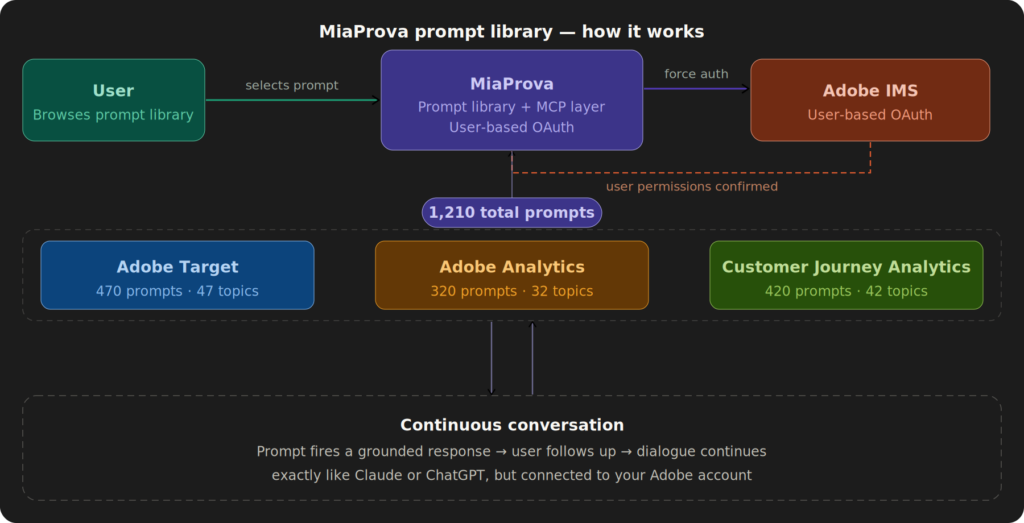
MiaProva is adding a curated, browsable prompt library directly inside the platform, covering three Adobe tools: Adobe Target, Adobe Analytics, and Customer Journey Analytics.
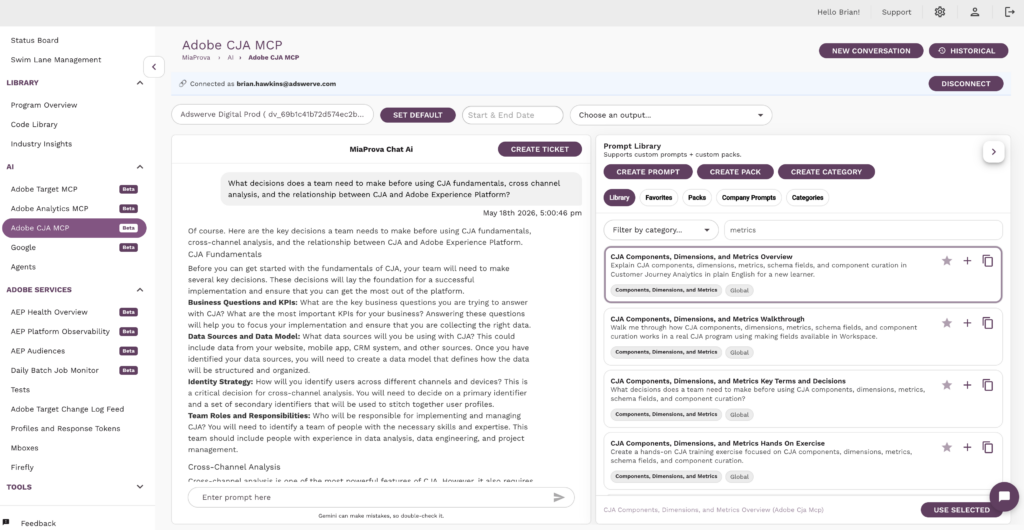
The library contains hundreds of structured prompts organized by topic and learning objective. For each topic…say, A/B Testing, or Auto-Allocate, or CJA Data Views…users will find multiple prompt types to choose from depending on what they need:
- Overview — plain English explanation for someone coming in fresh
- Walkthrough — step-by-step application inside the actual tool
- Key Terms and Decisions — the vocabulary and tradeoffs that matter most
- Hands-On Exercise — something to actually do, not just read
- Best Practice Checklist — a structured sanity check before moving forward
- Common Mistakes — what typically goes wrong and why
- Business Questions — the five questions this feature can actually answer for your stakeholders
- Examples by Level — beginner, intermediate, and advanced so users can meet themselves where they are
- Troubleshooting Guide — what to do when results don’t look right
- Knowledge Check — a short quiz to confirm understanding
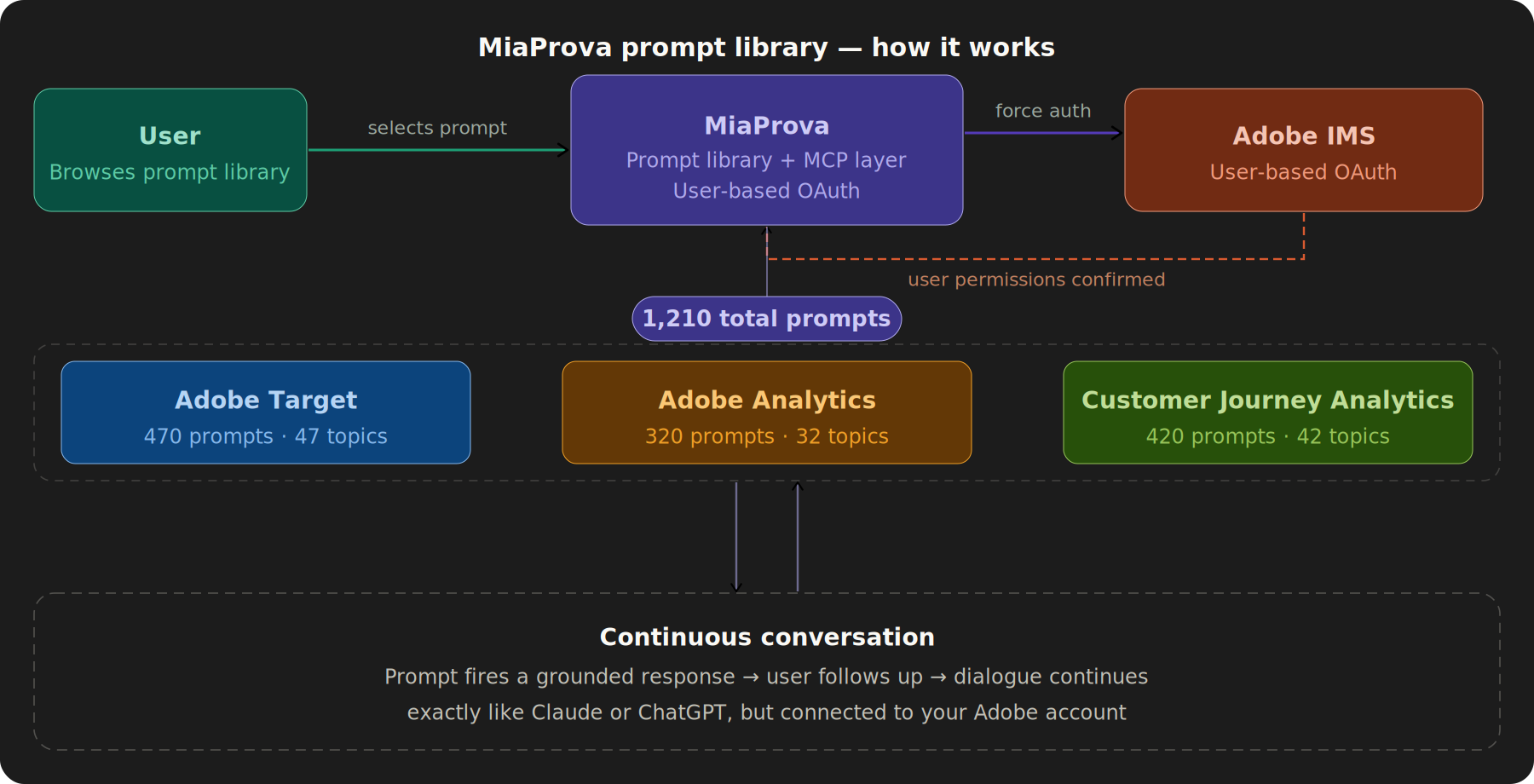
Users browse by category, pick a prompt that matches their current need, and send it… connected directly to their Adobe environment through MiaProva’s MCP integration. The response isn’t generic documentation. It’s grounded in their account, their activities, their data.
The Security Architecture That Makes This Work the Right Way
Before getting into what the prompt library does, it’s worth talking about how it’s built — because this is where MiaProva did something that most AI-Adobe integrations haven’t gotten right.
Most server-side Adobe integrations use service-to-server OAuth. That means a single set of credentials authenticates on behalf of everyone, with whatever permissions that service account was given at setup time. It’s simple to implement, and it’s also a meaningful governance problem: you’ve essentially created a backdoor that bypasses the permission model Adobe administrators worked to configure. A user who doesn’t have access to a particular property or activity type in Adobe can still reach it through an AI tool that runs on elevated service credentials.
MiaProva took a different approach. When a user starts an MCP session in MiaProva, the platform forces a user-level authorization with Adobe. The user authenticates as themselves. Their Adobe permissions, the ones their org’s administrators configured, are the permissions that govern what the AI session can see and do. If a user doesn’t have access to a particular workspace, or can’t edit certain activity types, that boundary holds in the AI session exactly the same way it holds when they log into Adobe directly.
This matters for a few reasons that go beyond security hygiene:
It makes AI-assisted work auditable. When actions are taken through the MCP session, they’re attributable to the user, not to an anonymous service account. That’s important for organizations that take governance seriously — and if you’re a MiaProva customer, you almost certainly do.
It means administrators don’t have to make a tradeoff. The choice isn’t between giving users AI-powered assistance or maintaining the permission structure they built. They get both. The AI layer respects the access model rather than routing around it.
It scales with your org’s existing governance. As roles change, as practitioners move between teams, as permissions are updated — the AI session reflects the current state automatically, because it’s just the user logging in as themselves.
For enterprise Adobe customers where access control isn’t an afterthought, this is the difference between an AI integration you can actually deploy broadly and one that requires a carve-out conversation with your security team every time someone new wants access.
Why This Is Different From Other Training Resources
The Adobe ecosystem has no shortage of training content. Adobe Experience League, third-party courses, partner-produced guides, community forums…the information exists. So why do so many teams still struggle to apply it?
The answer isn’t content volume. It’s context.
Generic training tells you how A/B testing works in Adobe Target. A prompt fired from inside MiaProva, connected to your Target instance, can tell you how A/B testing is working in your Target account — which activities are running, how they’re structured, where the gaps are between what the documentation recommends and what your implementation is actually doing. The learning is anchored to real objects in a real environment, not a sanitized demo.
This is the structural advantage that no static LMS, no video course, and no documentation site can replicate: the training tool is also connected to the thing being trained on. When a user asks about activity collision and priority management, the response can account for the actual activities they have running. When someone is learning about Auto-Allocate, they can immediately see how it compares to what’s live in their account.
That’s not a nice-to-have. For teams trying to build real competency — not just pass a certification — it’s the difference between learning a concept and being able to apply it.
The Prompts Are a Starting Point, Not a Ceiling
One thing worth being explicit about: the prompt library isn’t a menu of pre-packaged answers. It’s a launchpad for a real conversation.
Anyone who has spent time with Claude or ChatGPT knows how this works. You start with a question, get a response, and then the real value kicks in — you follow up, push back, ask for a different angle, say “now apply that to my specific situation,” or ask “wait, what does that term actually mean?” The back-and-forth is where understanding gets built.
MiaProva’s prompt library works exactly the same way. A user picks a prompt — say, the Auto-Allocate Best Practice Checklist — and gets a structured response grounded in their Adobe environment. But they don’t have to stop there. They can follow up with “how does this apply to our current homepage test?” or “show me an example using the activity that’s been running the longest” or “I thought the traffic threshold worked differently — can you clarify?” The conversation continues naturally, in plain language, with full context carried forward.
This is a meaningful departure from how Adobe tool training has historically worked. Documentation is static. Video courses can’t respond to your follow-up question. Support tickets have turnaround times. The prompt library gives users a knowledgeable, context-aware conversation partner available immediately, on any topic, at any depth they want to go.
For users who are already comfortable with AI chat tools in their personal workflows, this will feel familiar from the first interaction. For users who haven’t developed that habit yet, MiaProva’s structured prompts give them a safe, purposeful entry point — a starting question they didn’t have to figure out themselves, leading into a conversation they can actually navigate.
The Strategic Thinking Behind This
This feature came out of a consistent observation: the organizations that get the most out of Adobe tools aren’t necessarily the ones with the most experienced practitioners. They’re the ones with the best feedback loops between learning and doing. Their people can ask a question, get a grounded answer, apply it, and course-correct quickly.
Most training investments are front-loaded. You get onboarding, maybe a training engagement, and then you’re largely on your own. MiaProva’s prompt library flips that model toward something continuous and embedded. Learning is available at the moment of need — while someone is actually inside the tool, looking at a report, designing an activity, or trying to figure out why a metric doesn’t look right.
We also designed the prompt structure deliberately. Every topic gets the same ten angles — not because everyone needs all ten, but because different people on the same team need different things. An optimization practitioner building their first MVT needs different prompts than a marketing manager trying to understand what the results mean, or a new analyst trying to get their bearings in CJA. The library covers the full range without requiring users to know in advance which framing they need — they can see the options and pick.
Who This Is For
The short answer: anyone on your team who touches Adobe Target, Adobe Analytics, or Customer Journey Analytics and wants to get better at it.
More specifically, this is valuable for:
Teams onboarding new practitioners. Instead of a weeks-long ramp where someone reads documentation and shadows others, they can work through structured prompts — Overviews, Walkthroughs, Hands-On Exercises — against a real environment from day one.
Experienced users hitting edge cases. When someone who knows Adobe Target well encounters something unfamiliar — a new activity type, an unusual reporting behavior, a governance question — the Troubleshooting and Key Terms prompts give them a structured way to think through it without starting a support ticket.
Managers and stakeholders. The Business Questions prompts are specifically designed for people who need to understand what a capability can answer, without necessarily knowing how to operate it. They support better conversations between practitioners and decision-makers.
Anyone trying to apply a feature for the first time. Best Practice Checklists and Common Mistakes prompts are practical insurance against the mistakes that are easy to avoid if someone just tells you what they are.
What’s Coming
The initial launch covers Adobe Target, Adobe Analytics, and Customer Journey Analytics. Coverage spans the full feature surface of each tool — from fundamentals and interface navigation through advanced topics like statistical interpretation, machine learning-driven activity types, AEP integration, governance, and implementation.
We’ll be sharing more details on rollout timing soon. If you want to see it in action or talk through how this could fit into your team’s current enablement approach, reach out directly.
MiaProva provides monitoring, observability, and governance tooling for Adobe Experience Platform customers. Built by practitioners, for practitioners.