From mbox to the Edge: Why, and When, to Migrate Adobe Target to the Web SDK
If you run Adobe Target, you have probably heard that the Web SDK is where Adobe is taking everything. That is true. But “Adobe wants you to” is a weak reason to touch a stable personalization stack, and a bad reason to touch it badly. This post lays out what actually changes when you move Target from at.js to the Web SDK, what you gain, what you risk, and how to think about timing. No hype, just the tradeoffs a practitioner needs to make the call.
First, the libraries you already have
Adobe Target has always needed a client-side library to fetch experiences from Target’s servers and render them on the page. That library has gone through generations, and understanding the lineage matters because it explains why the Web SDK looks so different.
mbox.js was the original. The name comes from “marketing box,” a named region on the page that Target could swap content into. mbox.js was synchronous, it leaned on document.write, and it created the flicker problems that plagued early testing programs. It is long dead, but its vocabulary survives. When you hear “global mbox” or “mbox parameters,” that is mbox.js still echoing through the product.
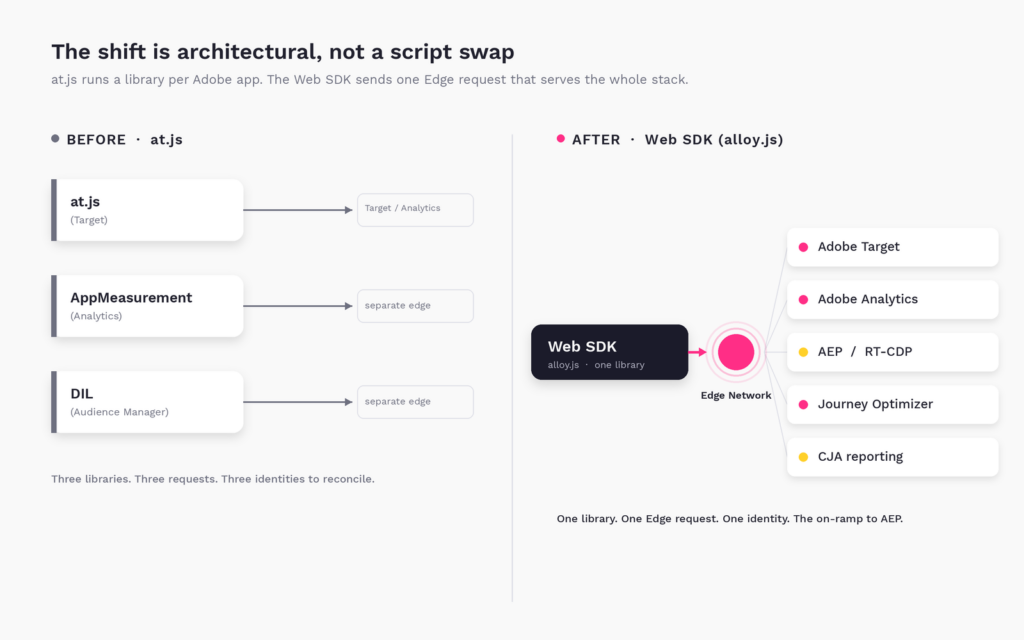
at.js replaced it and is what most mature Target implementations run today. at.js loaded asynchronously, dropped document.write, and added real flicker management, single-page-app support through triggerView, and cleaner delivery through functions like getOffers and applyOffers. It kept the mbox model but modernized how it fetched and applied content. Critically, at.js talks directly to Target’s own edge. If you also run Adobe Analytics and Audience Manager, each of those ships its own library making its own call. Three Adobe products, three libraries, three requests, three identity handshakes. That siloed architecture is exactly what the Web SDK exists to collapse.
What the Web SDK actually is
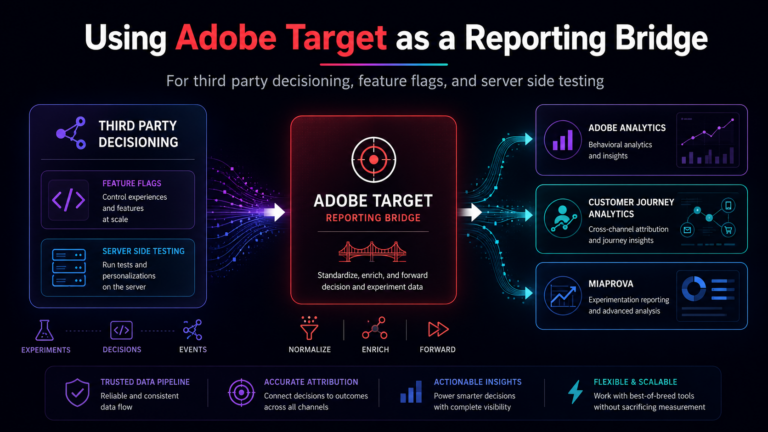
The Adobe Experience Platform Web SDK (the library file is alloy.js) is a single, lightweight client-side library that replaces at.js, AppMeasurement, and the Audience Manager DIL all at once. Instead of each Adobe product calling its own endpoint, the Web SDK sends one request to the Adobe Experience Platform Edge Network, and the Edge routes that data to whichever services you have configured.
The control point is the datastream, configured in Data Collection. A datastream is server-side routing logic: it decides that a given payload should light up Target, feed Analytics, land in an AEP dataset, and trigger edge destinations, all from one call. On the page, you stop thinking in mbox names and start thinking in decisionScopes and XDM. The old target-global-mbox becomes the __view__ scope. Data is structured as XDM rather than loose mbox parameters. You fire a sendEvent instead of stringing together getOffers and applyOffers.
This is the mental shift that trips teams up. Moving to the Web SDK is not swapping one script tag for another. You are moving from a library that Target owns to a shared library governed by a datastream that sits in front of your entire Adobe stack. That is more power and more coordination at the same time.
The pros and cons, honestly
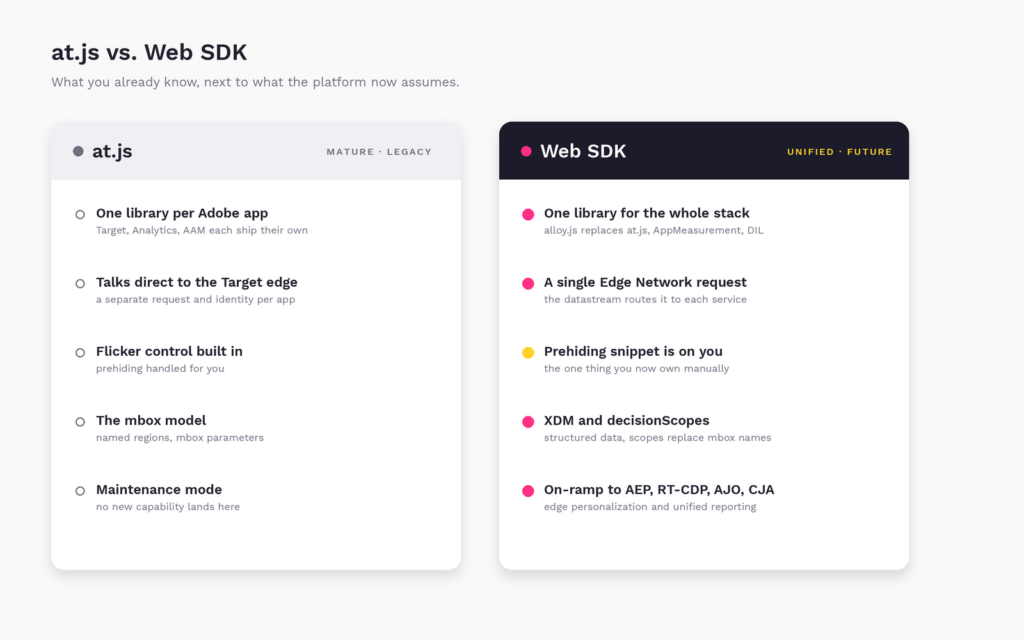
The safer thing you already know, next to the more capable thing the platform now assumes.
The Web SDK’s case is strong. One library instead of three means less weight on the page and one identity instead of several reconciling in the background. The single Edge request is the on-ramp to everything Adobe is building next: Real-Time CDP edge audiences, Adobe Journey Optimizer, edge and on-device decisioning, and Customer Journey Analytics. First-party identity is managed at the Edge, which matters more every year as third-party cookies keep degrading. And this is where new capability now lands. at.js is in maintenance mode. It is not disappearing tomorrow, but Adobe’s innovation ships to the Web SDK first, and increasingly only.
The cost is real and worth naming. The Web SDK carries a steeper learning curve, because XDM, schemas, and datastreams are a genuinely different model than mbox parameters. Flicker management that at.js handled for you now requires a prehiding snippet you place and maintain yourself. You have more moving parts that can be misconfigured, and most of them live in the datastream rather than in code you can read on the page. at.js, by contrast, is mature, deeply documented, and understood by your team today. It handles flicker out of the box. For a pure Target-only shop with no broader AEP ambitions, at.js still does the job it was built for. The honest summary: at.js is the safer thing you already know, and the Web SDK is the more capable thing the rest of the platform now assumes.
The AEP implications are the whole point
If you take one idea from this post, take this: the Web SDK is the front door to Adobe Experience Platform, and at.js is not. Data that flows through the Edge Network can be shaped into XDM, landed in AEP datasets, segmented at the Edge, and activated through Real-Time CDP destinations and Journey Optimizer. That is the value you cannot get from at.js at any price. Edge-based personalization, where an RTCDP audience qualifies a visitor and Target acts on it inside the same request, only exists because the Web SDK put Target and the Platform on the same rail.
So the migration question is really a strategy question. If your roadmap includes RTCDP, AJO, edge decisioning, or CJA, the Web SDK is not optional, it is the prerequisite. If your roadmap genuinely does not include any of that, the pressure is lower, though the direction of the platform still points one way.
A4T does not break, but it moves
Analytics for Target survives the migration, but the plumbing changes. With at.js and AppMeasurement, A4T stitched Target and Analytics together client-side using a shared supplemental data ID across two separate requests. With the Web SDK, both Target and Analytics ride the same Edge request, so the stitching happens at the Edge. You enable Target and Analytics on the same datastream, map your report suite, and A4T reporting continues.
The catch is the one Adobe repeats loudly, and you should too: all Adobe libraries on a page migrate together. You cannot run at.js for Target and the Web SDK for Analytics on the same page and expect A4T to stitch cleanly. The shared identity and shared request are the mechanism, and splitting them breaks it. Plan A4T continuity into the cutover, not after it.
CJA is the reporting upside people underestimate
Customer Journey Analytics is where the Web SDK quietly changes what is possible. Because the Web SDK sends XDM to the Edge, you can capture the personalization decisions Target served (the proposition data, in the _experience.decisioning structure) into AEP datasets, and those datasets flow into CJA. That means you can analyze Target experiences in CJA alongside every other data source you have connected, without A4T’s structural constraints.
In practice, this is a genuine upgrade. A4T answers Target questions inside Analytics. CJA lets you ask Target questions against your full cross-channel dataset: how an experience influenced downstream behavior weeks later, how it performed across segments you define in CJA, how it interacted with data Target never saw. Teams that only think of the migration as “keep A4T working” miss that the Web SDK is what unlocks Target reporting in CJA in the first place.
Compatibility across the Adobe stack
The Web SDK is designed to be the single client library for the whole Experience Cloud: Target, Analytics, Audience Manager, Journey Optimizer web and edge, and Real-Time CDP edge destinations, plus a matching Edge Network Server API for server-side work. That unification is the benefit, and the constraint is the flip side of it. Because identity (ECID) is managed differently by the Web SDK than by the legacy libraries, running both on the same page invites duplicate or mismatched identities. This is why the coordinated, everything-at-once migration per page is not a suggestion, it is the safe path.
How to migrate, at a high level
Treat this as an engineering project with a QA phase, not a find-and-replace.
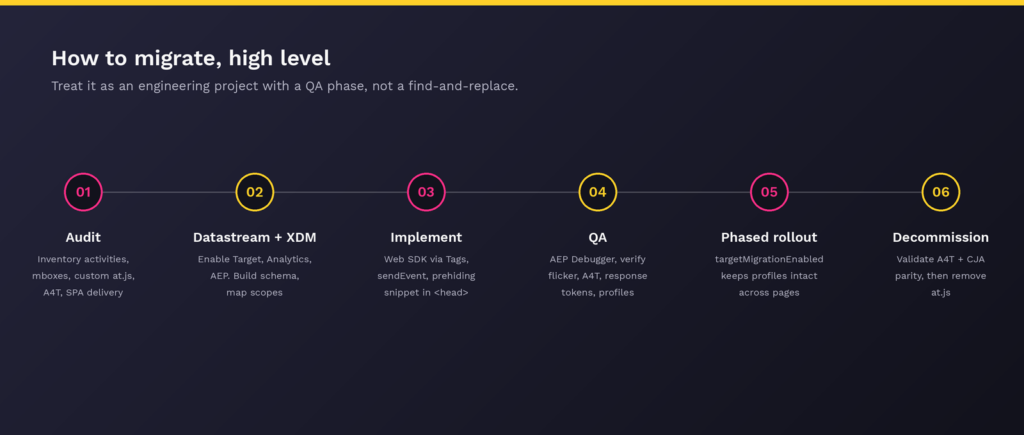
Start with an audit. Inventory your activities, your global mbox and any named mboxes, your custom at.js work (getOffers, applyOffers, triggerView, response tokens, custom settings), your A4T configuration, and any SPA delivery. This inventory is your migration scope, and it is almost always larger than teams expect.
Next, stand up the datastream in Data Collection with Target, Analytics, and AEP enabled as needed, and map your Target client code, report suite, and property token. Build your XDM schema and identity map, then translate your mbox names into decisionScopes, remembering that target-global-mbox maps to the __view__ scope.
Then implement the Web SDK, ideally through the Tags extension rather than hand-rolled alloy.js unless you have a reason. Translate your rendering logic: a sendEvent with renderDecisions for VEC and page-load activities, decisionScopes for form-based activities, applyPropositions where you used applyOffers, and view-based sendEvent calls for SPA views. Place the prehiding snippet in the head, before the library loads, or you will ship flicker.
If you are rolling out page by page rather than all at once, turn on targetMigrationEnabled. It lets the Web SDK read and write the legacy mbox cookie so a visitor’s Target profile stays intact as they move between at.js pages and Web SDK pages during the transition. Skipping this is how you fragment profiles mid-migration.
Finally, QA hard. Use the Experience Platform Debugger, the alloy_debug parameter, and the Visual Editing Helper. Verify flicker handling, A4T stitching, response token access, profile continuity, and reporting parity in both A4T and CJA before you decommission at.js. Then, and only then, remove the old library.
The risks worth pricing in
Flicker is the most visible failure and the easiest to cause, because the Web SDK does not manage it for you the way at.js did. Reporting discontinuity is the most expensive, because data split across old and new implementations creates gaps that are painful to reconcile after the fact. Profile fragmentation from skipping targetMigrationEnabled during a phased rollout, and identity duplication from running both libraries together, both come from the same root: the Web SDK and the legacy stack manage identity differently, so half-migrations are where things go wrong. Add datastream misconfiguration routing data to the wrong place, SPA edge cases, and the team skill gap around XDM and datastreams, and you have the full risk surface. None of these are reasons not to migrate. All of them are reasons to migrate deliberately, with QA and observability in place before cutover, not after.
Where Adswerve fits
This is the kind of migration that rewards experience, because most of the risk is in the parts that are invisible until production: the datastream logic, the identity handoff, the reporting continuity across A4T and CJA, and the phased-rollout profile handling. As an Adobe partner that lives in this stack every day, Adswerve helps teams scope the migration accurately, architect the datastream and XDM foundation correctly the first time, preserve A4T while opening up Target reporting in CJA, and stage a phased rollout that does not fragment profiles or drop data.
Just as important is what happens after cutover. Our MiaProva platform gives you observability into your AEP and Edge implementation, so you can see that data is flowing, audiences are qualifying, and experiences are rendering as expected, rather than finding out from a stakeholder that a report went flat. Migrating is a project. Knowing it stayed healthy is a capability.
The bottom line
Moving Adobe Target to the Web SDK is not a library swap, it is a shift onto the Edge Network that positions your program for AEP, RTCDP, AJO, and CJA. The case for waiting is legitimate if you are purely Target-only, stable, and have no Platform roadmap. The case for never migrating is not, because at.js is in maintenance mode and the rest of the Adobe stack has already moved. The right question is not whether, it is when, and how well. Do it deliberately, migrate every Adobe library on a page together, protect your profiles and your reporting through the transition, and you come out with a lighter, unified, future-ready foundation instead of a legacy library on borrowed time.