Audience Usage & Lineage in MiaProva: Know What Every RT-CDP Audience Touches
Every mature Real-Time CDP sandbox ends up with the same question: if I change or delete this audience, what breaks? MiaProva now answers it on every audience with a new Usage & Lineage tab that shows what an audience is built from, which audiences depend on it, and where it is activated.
Usage & Lineage is the second addition to AEP Audiences in two weeks. On November 17 we shipped Audience Collections and Favorites, which organize audiences by program. Lineage adds the other half: how those audiences connect to each other and to the channels they feed.
The sandbox behind the screenshots in this post holds 6,417 audiences. That is typical for an enterprise retailer running email, SMS, push, paid media, direct mail and on-site personalization out of one platform. Audiences reference other audiences, those composites reference more audiences, and the results flow to Adobe Target, file exports and messaging tools. Nobody holds that graph in their head, and until now nobody could see it in one place.
All screenshots come from a live customer sandbox and have been anonymized. Company, brand, vendor, program and user names are replaced (“ACME”, “Brand A”, “Fitness”); counts, complexity scores and structure are real.
What’s new
Open any audience from AEP Audiences (the Audience Health & SLA list) and select the Usage & Lineage tab. It sits next to Overview (size, 14-day trend, status) and Complexity, so health, rule complexity and dependencies live on one page.
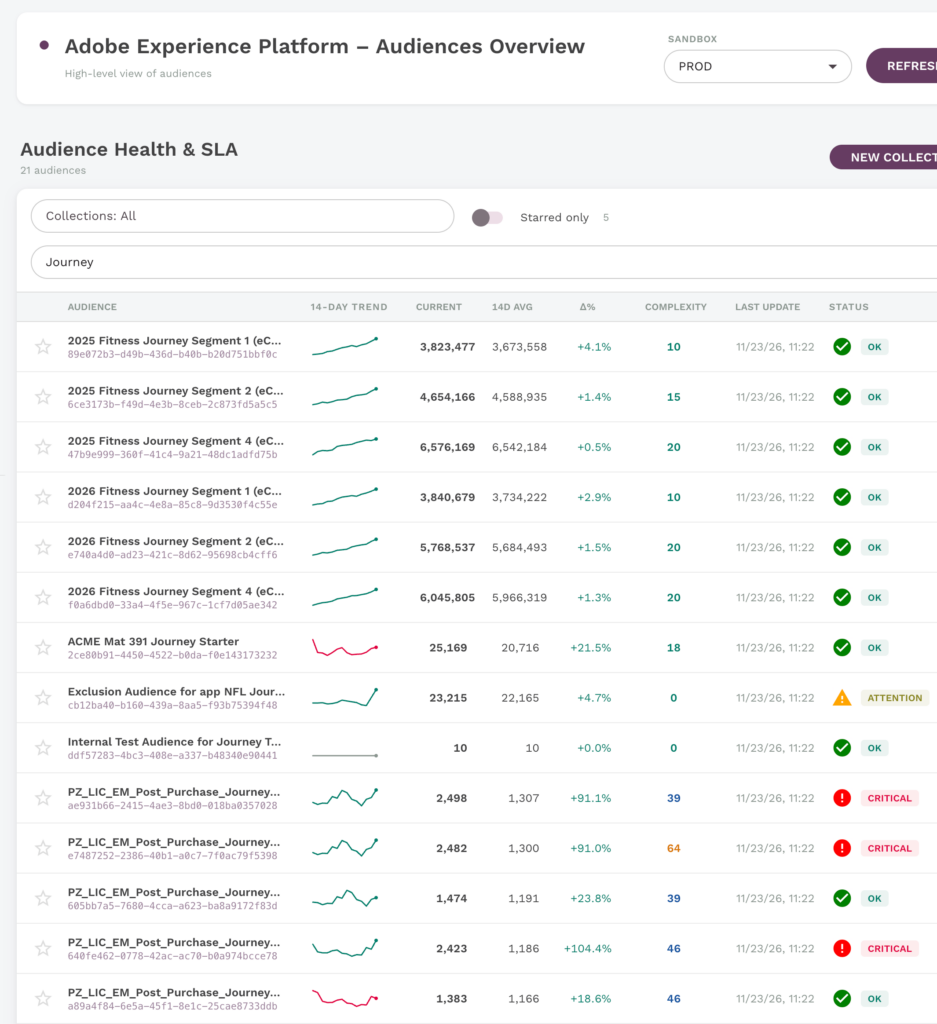
The tab has three parts:
| Element | What it shows | Why it helps |
|---|---|---|
| Built from | Audiences this one references in its rule | Shows upstream inputs that can change this audience’s size without anyone editing it |
| Nested in | Audiences that reference this one | Shows the blast radius of an edit or deletion |
| Destinations | Activation dataflows, with status and cadence (for example “Active Dataflow · once”) | Shows where profiles actually leave the platform |
| Lineage graph | Built from → this audience → Nested in / Destinations, left to right, with complexity and a downstream dependency count on the center node | One picture instead of opening definitions one by one |
Every card in the graph is clickable, so you can walk the chain from a building block to the composite that uses it and on to its destination. Each view also has its own URL, which makes it easy to drop into a ticket or a Slack thread.
The lineage also drives a safety rail: Delete is disabled when an audience has downstream dependencies. Hovering it explains why, for example “This audience can’t be deleted because other audiences are built from it and it is activated to destinations.” Audiences with zero dependencies keep an active Delete button.
Six audiences, six stories
We clicked through the audience list and picked six audiences that show the patterns you will find in any large sandbox.
| # | Pattern | Example | Built from | Nested in | Destinations | What it tells you |
|---|---|---|---|---|---|---|
| 1 | Middle link | Brand D Fitness and Deals | 3 | 2 | 0 | An edit here silently changes two journey segments |
| 2 | Composite | 2025 Fitness Journey Segment 1 | 26 | 0 | 1 | 26 inputs can move this audience’s size |
| 3 | Building block | Browse Sale Products | 0 | 9 | 1 | A foundation audience with 10 dependents |
| 4 | High fan-out | Active Credit Card Holders | 0 | 20 | 1 | Complexity 0, yet 21 downstream dependencies |
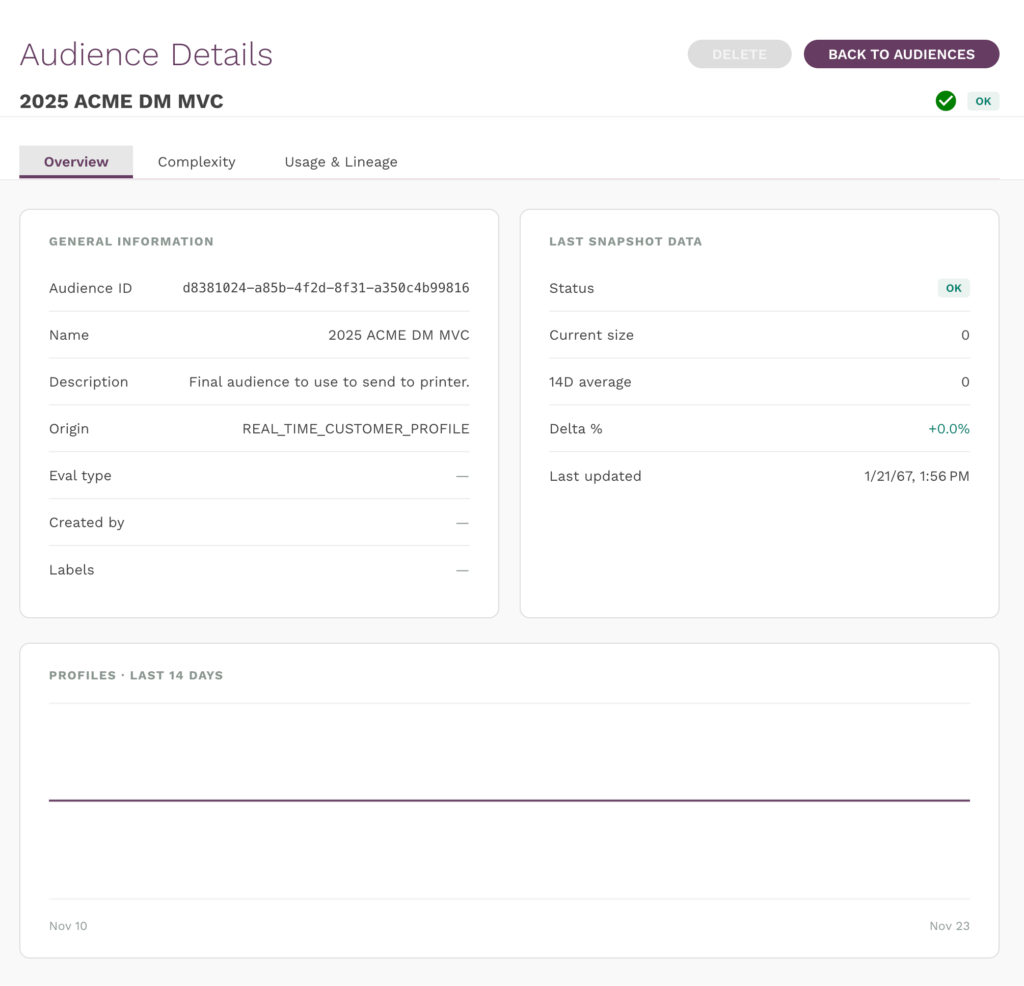
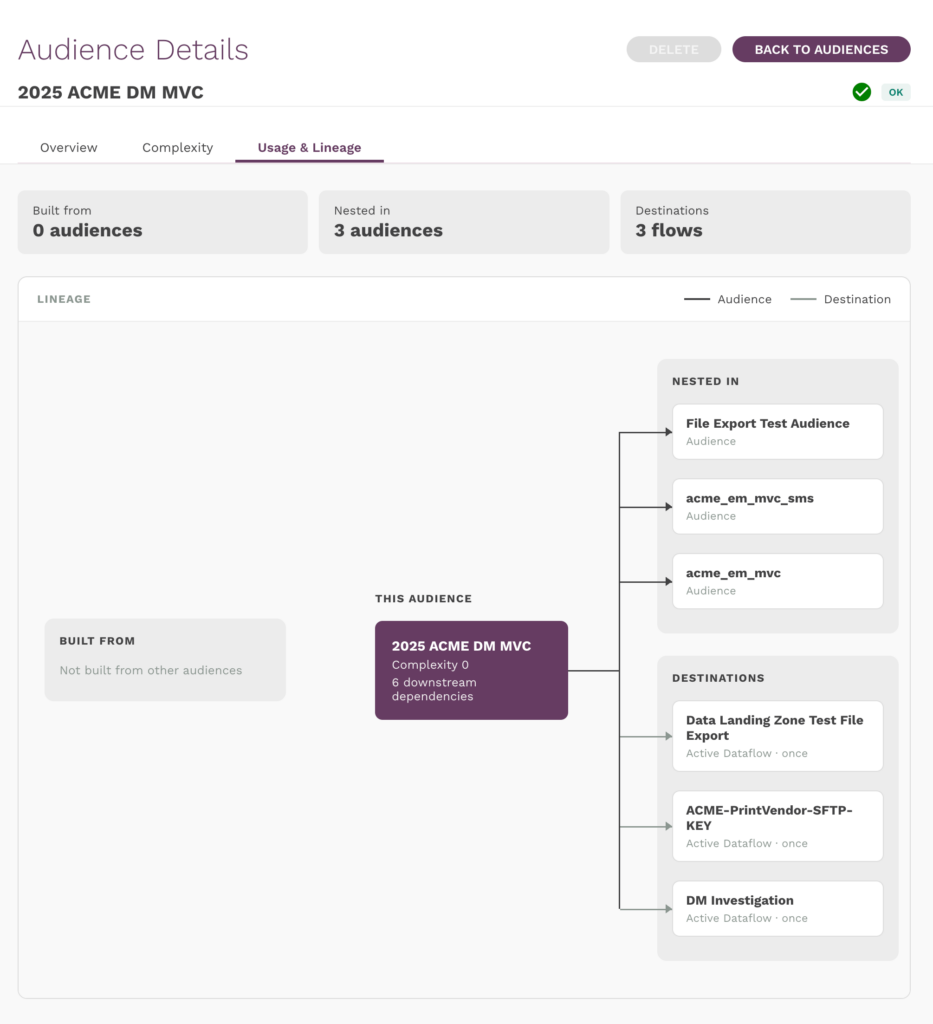
| 5 | Looks dead, isn’t | 2025 ACME DM MVC | 0 | 3 | 3 | 0 profiles, but wired to 3 file exports |
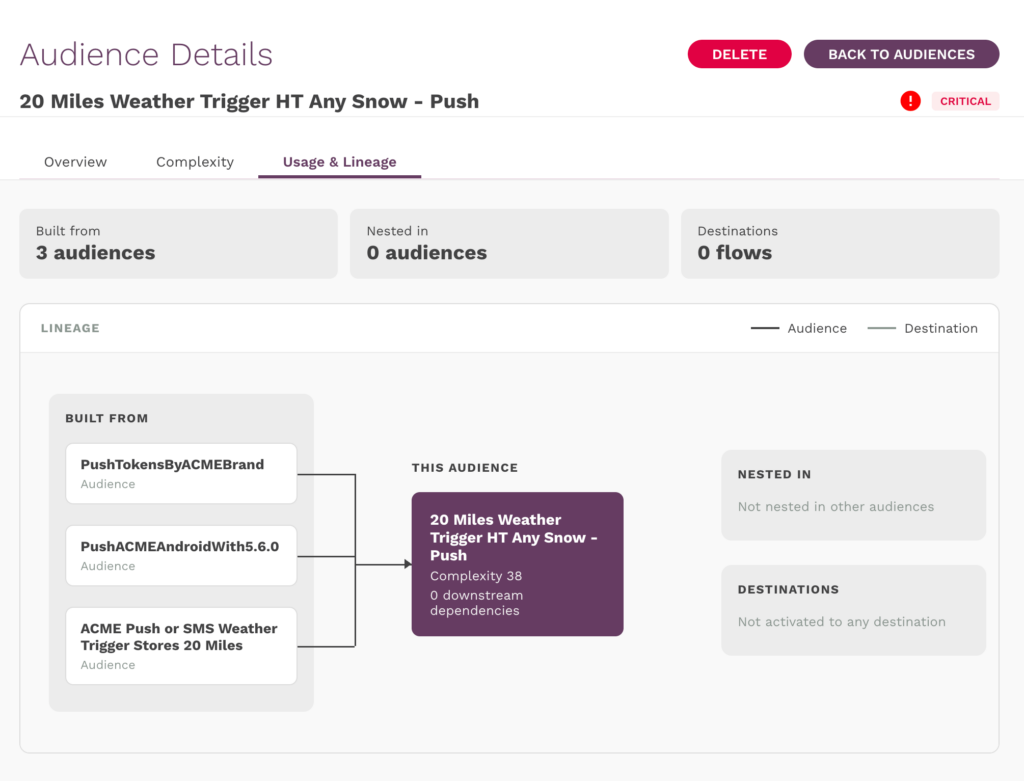
| 6 | True orphan | 20 Miles Weather Trigger – Push | 3 | 0 | 0 | Critical alert on an audience nothing consumes |
1. The middle link
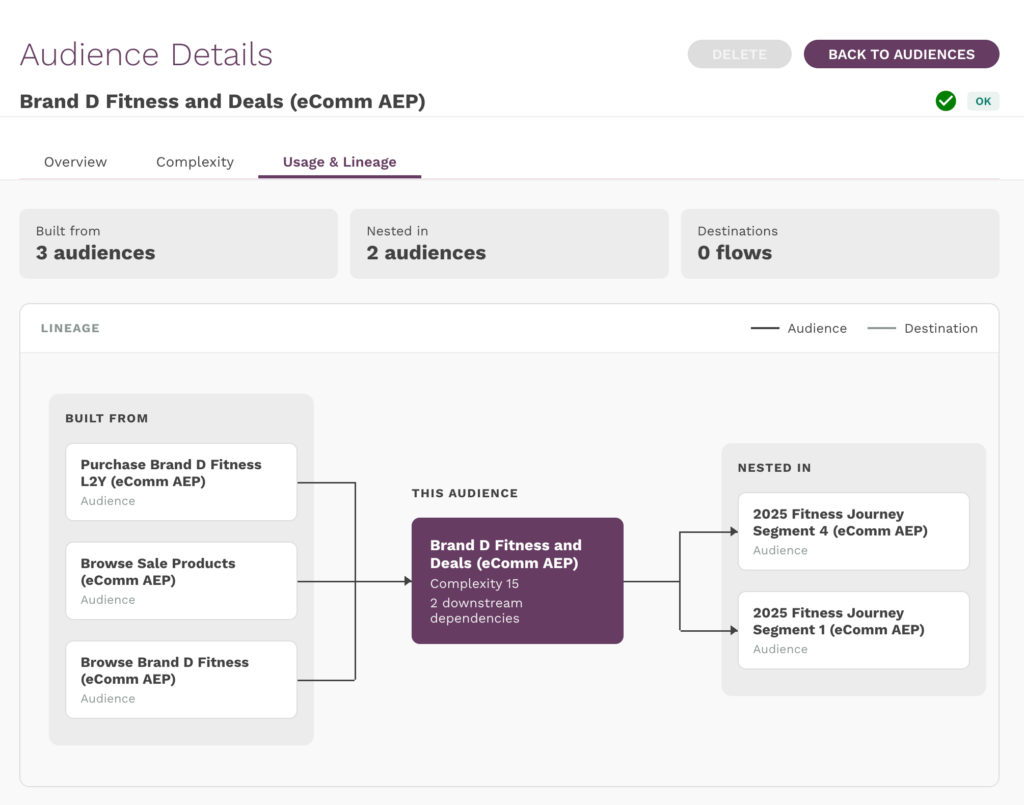
“Brand D Fitness and Deals” combines three inputs (past purchasers, brand browsers and sale browsers) and is itself nested in two Fitness Journey segments. The page says it plainly: complexity 15, 2 downstream dependencies, 0 destinations. Someone tidying up brand audiences would not guess that renaming or tightening this rule changes two journey segments that feed Target.
2. The composite
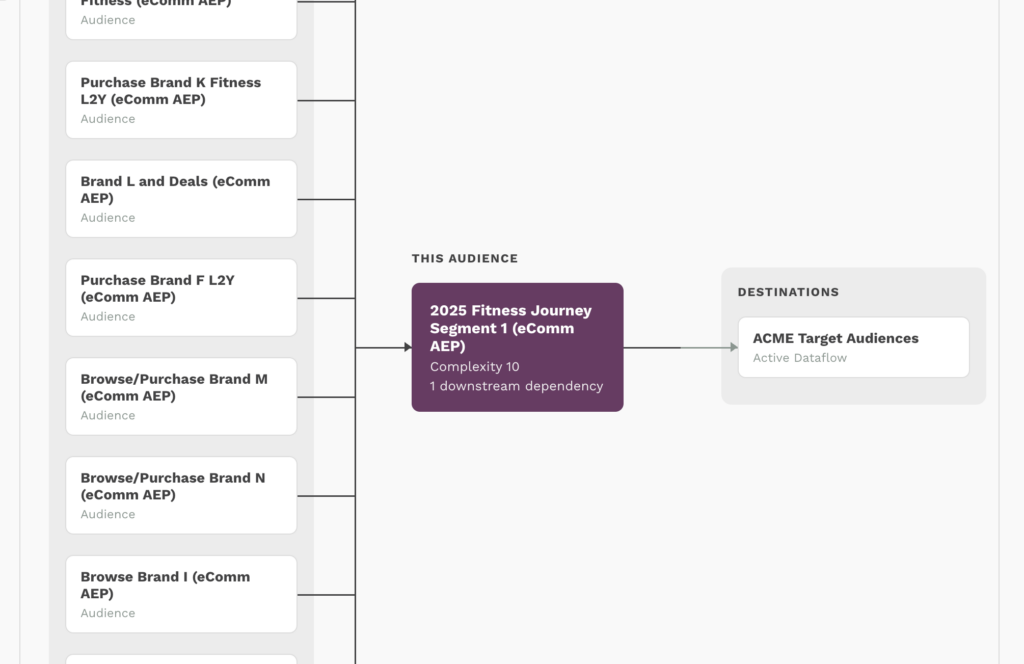
“2025 Fitness Journey Segment 1” is built from 26 brand and category audiences and activated to the ACME Target Audiences destination. When its size jumps 4% week over week, the cause is usually upstream. Lineage shows exactly which 26 audiences to check, and each one is a click away.
3. The building block
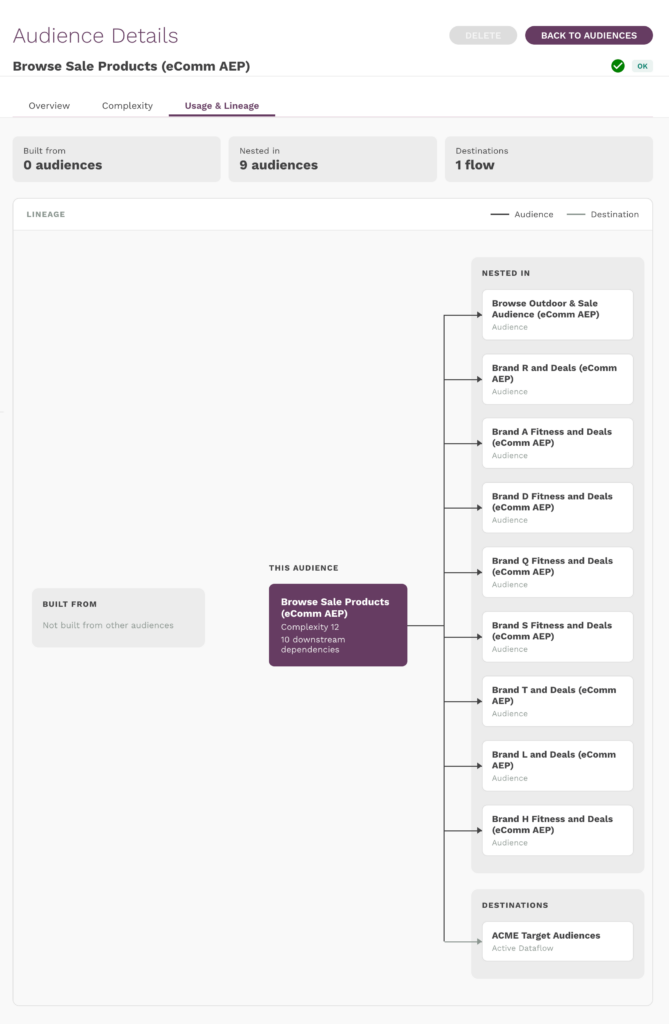
“Browse Sale Products” is built from nothing, so it looks like a simple behavioral audience. Lineage shows it is nested in nine brand-and-deals audiences and also activated directly to Target: 10 downstream dependencies. This is the audience whose definition deserves an owner, a description and change review.
4. High fan-out
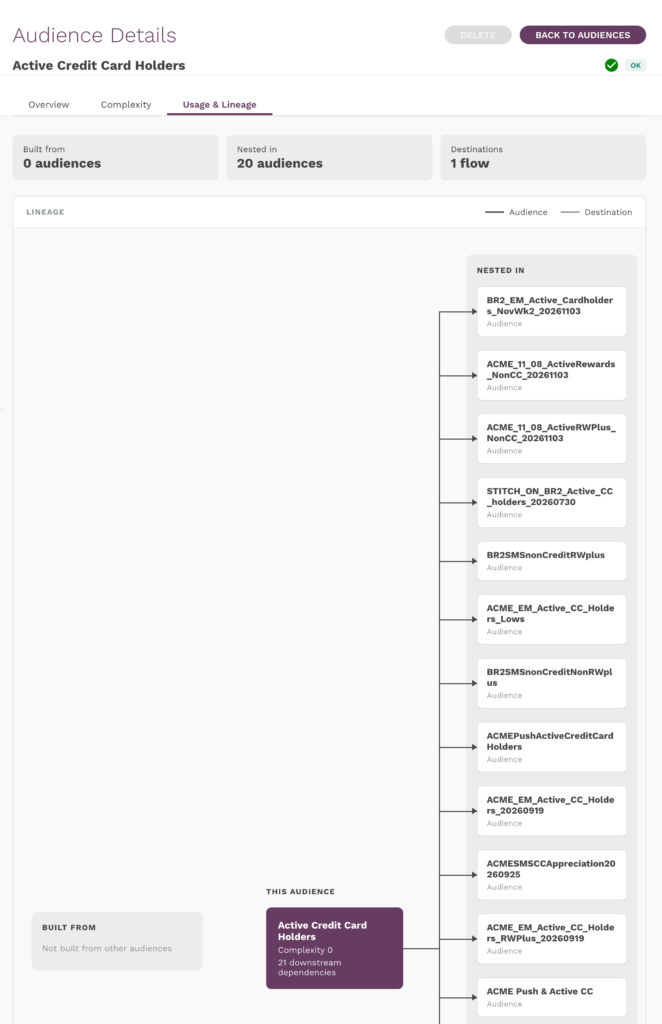
“Active Credit Card Holders” has a complexity score of 0, so a rule-centric review would skip it. Lineage shows 20 audiences built on it (email, SMS and push lists, many date-stamped campaign copies) plus a Target destination. That is 21 downstream dependencies on one audience, and a clear sign that dated copies should be consolidated.
5. Looks dead, but isn’t
“2025 ACME DM MVC” shows 0 profiles over 14 days and sits in the customer’s own “Cleanup Review” collection. On size alone it is a deletion candidate. Lineage shows it is nested in three audiences and wired to three active one-time file exports, including the SFTP feed to the direct-mail print vendor. Its description reads “Final audience to use to send to printer.” Deleting it would break the next mail drop, not save clutter.
6. The true orphan
“20 Miles Weather Trigger HT Any Snow – Push” is flagged Critical in the audience health list (41 profiles against a 173 average, down 76%). Lineage shows it is nested in nothing and not activated anywhere: 0 downstream dependencies, and the only audience in this set with an active Delete button. The team can stop chasing the alert and decide whether to retire it or reconnect it.
How this differs from what you see in AEP
Adobe’s Audience Portal is built for defining and activating one audience at a time. It answers “what is in this rule” and “where is this audience activated” well. The reverse question, “what depends on this audience,” means opening other definitions one by one or querying the APIs, and AEP surfaces a dependency mostly at the moment a delete or edit is refused.
| Question | In the AEP UI | In MiaProva |
|---|---|---|
| Which audiences does this one reference? | Read the rule in Segment Builder | Built from list and graph, each card clickable |
| Which audiences reference this one? | No reverse view; search definitions or use the API | Nested in count and graph |
| Where is it activated? | Destinations listed on the audience detail | Destinations shown on the same graph, with dataflow status and cadence |
| How many things break if I change it? | Not summarized | Downstream dependency count on the audience node |
| Is it healthy, and does that matter? | Size and evaluation details per audience | Size trend, delta, status and complexity on the same page as lineage |
| Can I safely delete it? | Find out when the delete is attempted | Delete disabled up front, with the reason on hover |
| Can I review all 6,000+ at once? | Paged audience inventory | Health list with collections, stars and search, one click to lineage |
The difference is context. AEP stores the facts. MiaProva joins them across audiences, destinations and daily health snapshots, so the answer to “what happens if” is on screen before anyone touches the rule.
Why it matters to the organization
Audience sprawl is not a tidiness problem. It is a reliability, cost and governance problem, and lineage touches all three.
- Fewer self-inflicted incidents. The riskiest edit in RT-CDP is a small change to a shared building block. Lineage puts the blast radius (“10 downstream dependencies”) in front of the person making the change.
- Cleanup without fear. Teams avoid deleting anything because they cannot prove it is unused. Zero dependencies plus zero destinations is that proof; one active file export is the reason to stop.
- Headroom under platform limits. AEP enforces guardrails on audience definitions and evaluation. Retiring true orphans and consolidating date-stamped copies frees capacity for new use cases.
- Faster root cause. When a composite’s size moves, lineage narrows the search to its inputs in seconds instead of an afternoon of opening rules.
- Alerts that reflect impact. A critical size drop on an audience feeding Target and three file exports is urgent. The same drop on an orphan is not. Lineage lets teams triage by consequence.
- Audit and ownership. Knowing which audiences feed which destinations is the starting point for consent reviews, vendor data-sharing audits and assigning owners to shared audiences.
What teams can do with it
A practical playbook for the first month:
- Find your foundations. Open the audiences your naming conventions mark as building blocks (browse, purchase, loyalty, credit card). Any with a high Nested in count gets a named owner, a real description and a change-review rule.
- Add an impact check to change requests. Before editing a rule, paste the Usage & Lineage link into the ticket with its downstream dependency count. Reviewers see the blast radius without logging into AEP.
- Run a safe cleanup pass. Filter to 0-profile or “Cleanup Review” audiences and open lineage on each. Retire the ones with no Nested in and no Destinations. Keep, rename or document the ones that, like the direct-mail audience above, still feed an export.
- Consolidate fan-out. Where one base audience feeds many date-stamped copies (20 in the credit-card example), replace the copies with one parameterized audience or a scheduled refresh.
- Triage alerts by consequence. When an audience goes Critical, check lineage first. Downstream destinations mean escalate now; zero dependencies means review in the next cleanup cycle.
- Debug size swings upstream. For composites, open each Built from input and compare their 14-day trends to find the one that moved.
- Group by dependency. Build an Audience Collection for each shared building block and its dependents, so the right people subscribe to alerts on the audiences they actually rely on.
Tips for reading the graph
- The number on the center card counts audiences that reference this one plus active destinations.
- Complexity measures the rule, not its importance. A complexity-0 audience can still be the most depended-on one in the sandbox.
- Destination cards show cadence. “Active Dataflow · once” usually means a scheduled or one-time file export, which is easy to miss in a cleanup.
See it on your own audiences
Usage & Lineage is live for RT-CDP audiences in MiaProva today. It builds on the audience health monitoring customers already use, so the same page now answers three questions: is this audience healthy, how complex is it, and what depends on it.
Collections, Favorites, and now Usage & Lineage all live on the AEP Audiences page, next to the health and SLA data teams already watch. More RT-CDP governance is coming to that page in the weeks ahead.
If your sandbox has grown past the point where anyone can say what an audience feeds, connect it to MiaProva and open the Usage & Lineage tab on the audience you are most nervous about touching. Reach out to your Adswerve team for a walkthrough.