MiaProva Brings Adobe MCP Tooling to the Masses: Here’s How to Get Started
Adobe’s Model Context Protocol (MCP) tooling represents a meaningful shift in how practitioners can interact with Adobe Experience Cloud products, enabling them to query data, surface insights, and drive workflows through natural language and AI-native interfaces. At MiaProva, we’ve been tracking this closely, and we’re excited to share that we’ve now built native support for Adobe’s MCP tooling directly into the MiaProva platform, covering Adobe Target, Adobe Analytics, and Customer Journey Analytics.
Why This Matters
MiaProva has been deeply integrated with Adobe’s ecosystem for a long time, going all the way back to the JWT authentication era when we were proudly among the first commercial applications to implement JWT-based authentication for both Adobe Target and Adobe Analytics. When Adobe made the move to OAuth server-to-server, we re-architected accordingly and have been running smoothly on it ever since.
That server-to-server OAuth integration provides read-only access to Adobe Target, Adobe Analytics, and Customer Journey Analytics, and it has been the backbone of MiaProva’s monitoring and observability capabilities. MCP tooling, however, introduced a new requirement: user-level authentication. Server-to-server credentials operate as a system identity and don’t carry individual user permissions or respect product profile configurations. Adobe’s MCP tools act on behalf of a specific authenticated user, which means they need to know who is making the request and what they are allowed to access.
So we added OAuth user authentication support to MiaProva. When a user initiates an MCP session, they authenticate directly with Adobe, establishing their identity, permissions, and product profile access in the process. It’s a cleaner, more secure model for this use case and it’s what Adobe requires.
Getting Set Up: Two Steps
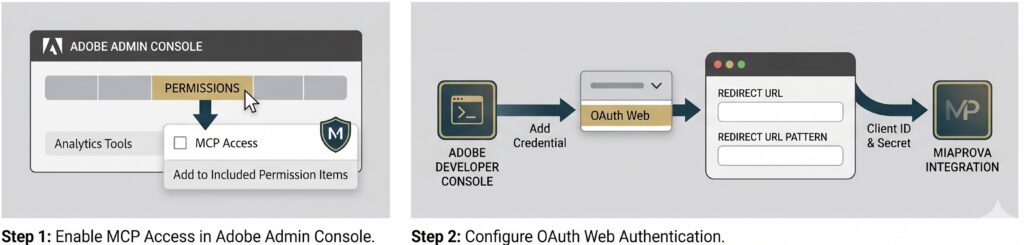
Getting MCP tooling working requires a couple of configuration steps on Adobe’s side. Here’s what that looks like.
- Log into the Adobe Admin Console and locate the Adobe Analytics Product Profile you want to use for MCP. MiaProva customers typically use the native Web Access Product Profile.
- Click on Permissions, then navigate to Analytics Tools.
- Add MCP Access to the Included Permission Items.
Step 1: Enable MCP Access in the Adobe Admin Console
This step grants the product profile the ability to participate in MCP sessions. It’s required whether you’re using MiaProva or building your own internal tooling.
Step 2: Configure OAuth Web Authentication in the Adobe Developer Console
- Log into the Adobe Developer Console.
- Find or create a project to use for authentication.
- Add or edit your Adobe Analytics product within the project.
- Click Add Credential and select OAuth Web.
A note on why this is Analytics-only: You’ll notice that OAuth Web credentials are configured at the Adobe Analytics product level rather than at the Adobe Target level. This reflects how Adobe has architected MCP support today. The MCP server endpoints and user-level OAuth flows are currently available for Analytics and Customer Journey Analytics, while Adobe Target continues to rely on server-to-server OAuth for its integration layer. In practical terms, Target data in MiaProva continues to flow through our established server-to-server credential, while Analytics and CJA MCP sessions operate under the user-authenticated OAuth Web credential you’re configuring here. Adobe may expand MCP coverage to Target in the future, but for now the two products use different authentication mechanisms by design.
- Provide the Redirect URL and Redirect URL Pattern. MiaProva customers can find both values on the Adobe Integration page within MiaProva.
- Save the credential, then copy the Client ID and Client Secret into MiaProva or your internal tooling.
That’s it. Once these pieces are in place, the MCP session flow is handled automatically within MiaProva.
The Road Ahead
The MiaProva and Adswerve teams are actively working with customers to discover where Adobe MCP tooling can deliver the most value.
Some use cases are obvious right away. Others emerge only after practitioners begin experimenting with natural language workflows connected to their real Adobe accounts. That discovery process has been exciting to watch because it brings together AI, Adobe expertise, governance, observability, and practical business questions in a very tangible way.
For MiaProva, this is a natural extension of what we have always focused on: helping organizations get more value, visibility, and confidence from their Adobe investments.
Adobe MCP tooling gives practitioners a new way to interact with their data and workflows. MiaProva helps make that capability easier to access, easier to govern, and more practical for teams that are already managing complex Adobe environments.
Want to Learn More?
If you would like to learn more about MiaProva, our Adobe MCP integration, or our broader Adobe observability and monitoring services, we would love to talk.
The technology is moving quickly, and the use cases are still evolving. But one thing is clear: MCP represents a meaningful new way for Adobe practitioners to work, and MiaProva is excited to help bring that capability to more teams.