
Measuring Automated Personalization in CJA
One field group, six steps. And it works for every other Target activity type while you’re at it.

What AP is, and why it’s worth measuring properly
Automated Personalization is the smartest thing in Adobe Target. Instead of you deciding which experience each segment sees, AP builds a machine learning model per offer, watches which visitors convert on which offers, and learns which visitor attributes predict a winner. Then it makes that call for every visitor, in real time, on every request.
It’s doing something an A/B test can’t. An A/B test finds the one experience that wins on average. AP finds the experience that wins for this visitor, and it keeps getting better as more conversions come in. When you’ve seen one running on a high traffic page with a decent offer set, the difference is not subtle.
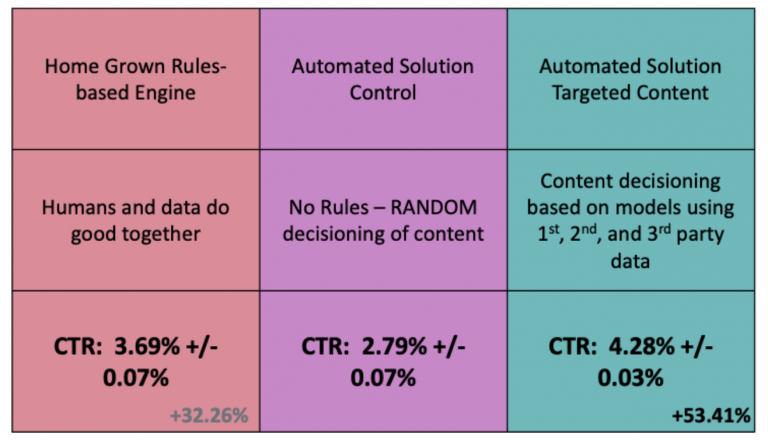
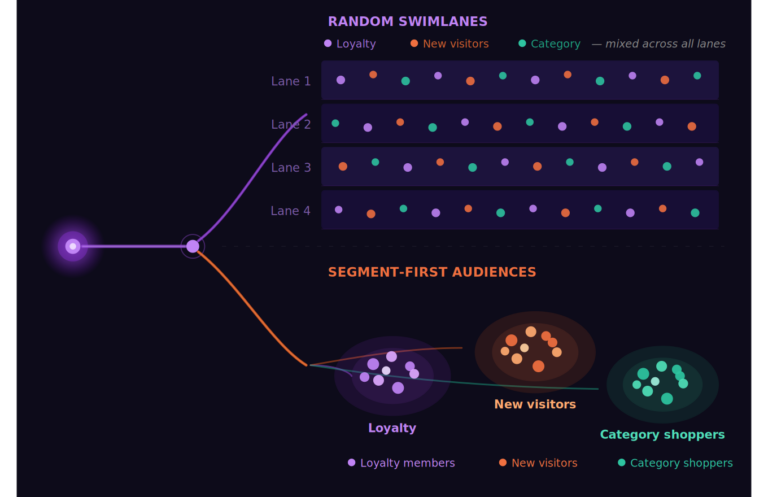
It also holds out a control group automatically. A slice of visitors get randomly assigned experiences instead of model picked ones, so AP can report lift against what would have happened without it. That control group is the whole reason this post works. Hold that thought.
Why you can’t see it in CJA
Here’s the catch. CJA’s Target integration rides on A4T, and A4T doesn’t support Automated Personalization. Adobe’s docs say it plainly: AP and Auto-Target don’t support Customer Journey Analytics as a reporting source. A/B, Experience Targeting, MVT, and Recommendations all flow through. AP doesn’t.

So the smartest activity type in Target is the one you can’t put next to your stitched, cross channel, offline inclusive CJA metrics. You can see AP performance inside Target against the goal metric you gave it. You can’t see whether the people AP personalized went on to do anything the business actually cares about.
The fix is to carry the data over yourself. Target already tells you everything you need in every response. You just have to catch it.
The six steps
1. Turn on response tokens
Response tokens are metadata Target returns alongside the content it serves. They’re account level, they’re off by default, and you turn them on once in Target under Administration, Response Tokens.
You want four of them. activity.name and activity.id identify the activity. experience.name tells you which experience or, for AP, which assembled offer combination the visitor got. And experience.trafficAllocationType is the one that makes this whole thing possible: it returns control or targeted, and it’s populated only for AP and Auto-Target.
That last token is a randomized, server assigned treatment flag. It’s the cleanest causal instrument you’ll ever get for free, and most implementations throw it away on every page load.
2. Build the XDM field group
Add a field group to the ExperienceEvent schema your Web SDK datastream writes to. Make it an array of objects, one object per activity the visitor was exposed to on that event.

The array shape isn’t a style choice. CJA’s Experimentation panel requires the experiment dimension and the variant dimension to live inside the same object array. Split them into flat fields and the panel won’t pair them. It’s also what keeps three activities on one page from bleeding into each other, because CJA preserves the row level correlation between fields in the same array element.
Notice the variant field. It’s normalized on purpose. AP and Auto-Target compare control against targeted, so for them variant carries the allocation type. A/B, XT, and MVT compare experiences against each other, so for them it carries the experience name. One Variant dimension, every activity type.
3. Extract the tokens in Tags
Response tokens come back on each proposition item’s meta. In Tags, build a rule on the Adobe Experience Platform Web SDK “Send Event Complete” event. It hands you event.propositions:
javascript
var seen = {};
var rows = [];

(event.propositions || []).forEach(function (proposition) {
  (proposition.items || []).forEach(function (item) {
    var meta = item.meta;
    if (!meta || !meta["activity.id"]) { return; }

    // One activity can span several mboxes. Collapse duplicates.
    var key = meta["activity.id"] + "|" + meta["experience.id"];
    if (seen[key]) { return; }
    seen[key] = true;

    // Only AP and Auto-Target populate this. Absent means fixed split.
    var alloc = meta["experience.trafficAllocationType"];
    var variant = alloc || meta["experience.name"];

    var row = {
      activityId:     String(meta["activity.id"]),
      activityName:   meta["activity.name"],
      experienceId:   String(meta["experience.id"]),
      experienceName: meta["experience.name"],
      variant:        variant,
      experimentKey:  meta["activity.name"] + " :: " + variant
    };
    if (alloc) { row.trafficAllocationType = alloc; }
    rows.push(row);
  });
});

window._targetContext = rows;
Then a Custom Code data element that returns window._targetContext || [], mapped to the array node in your page view XDM. Always an array, never null.
4. Get it onto the right event
This is where most implementations go sideways. Response tokens don’t exist until the Edge responds, so they can’t ride on the call that asked for them. And if you stash them for the next page view, the exposure lands one page late and gets credited to the wrong URL.

The fix is two Web SDK calls. Rule one fires at page top: a Send Event with type decisioning.propositionFetch and rendering enabled. Rule two fires on Send Event Complete: it runs the extraction above, then sends your actual page view as web.webpagedetails.pageViews with the array attached.
One thing you will hit exactly once and never forget: Send Event Complete fires for every Web SDK call, including the second one rule two just sent. Put a guard on rule two or it loops.
javascript
if (window._targetPageViewSent) { return false; }
window._targetPageViewSent = true;
return true;
5. Configure the CJA Data View
Confirm the dataset is in your CJA connection, then add the array fields as dimensions. Two of them get context labels: apply “Experimentation Experiment” to Target Activity Name and “Experimentation Variant” to Target Variant. That’s what makes them show up in the Experimentation panel.
Persistence is the trap here. You’d think you’d persist Activity Name and Variant so conversions later in the session carry the exposure. With one activity, fine. With several, no. Persistence copies dimension values forward, not array structure, so a conversion event inherits three activity names and three variants with nothing tying them together. Your control group contaminates and the numbers still look plausible.
That’s what experimentKey is for. It fuses activity and variant into one string in the browser, before anything can pull them apart. Persist that one (Most recent, bound to Person, expiring with the session or your conversion window). Leave the two labeled dimensions unpersisted and let the Experimentation panel do its own attribution from the exposure event.
6. Analyze
Drop an Experimentation panel into Workspace. Pick your AP activity as the experiment, control as the control variant, and up to five CJA success metrics. You get lift and anytime valid confidence at 95 percent. That “anytime valid” bit matters for AP specifically, since it runs forever and you’ll check it constantly, and this kind of confidence doesn’t inflate false positives when you peek.
For everything the panel doesn’t answer, go freeform. Target Activity and Variant as rows with your conversion metrics as columns is your reconciliation table against Target’s own report. Break the targeted arm down by Target Experience Name to see which offer combinations the model actually leaned on. Build a Person scoped segment on Target Traffic Allocation equals control and you’ve got a portable holdout you can drop into any project to measure what personalization is worth in aggregate.
A few things before you trust the numbers
Check the response first. Confirm trafficAllocationType is actually on the meta for an AP activity. If it’s missing, the token is off or the activity isn’t AP.
Check the outbound payload second. The second interact call should carry a populated array. Empty array with a populated response means the extraction or the guard is misfiring.
If A4T is already feeding your A/B and XT activities into CJA, decide about the overlap on purpose. Either narrow the extraction to AP and Auto-Target only, so this covers exactly the gap A4T leaves, or send everything through the field group for one consistent dimension set. Both work. Running both without documenting it is how someone builds a report on the wrong dimension six months from now.
And remember occurrence metrics inflate. Three activities on a page view means three array elements on one event. Normalize on Unique People or Sessions, never on event counts.
That’s it. Six steps, one field group, and the most intelligent thing in Target finally sits next to the metrics that matter.