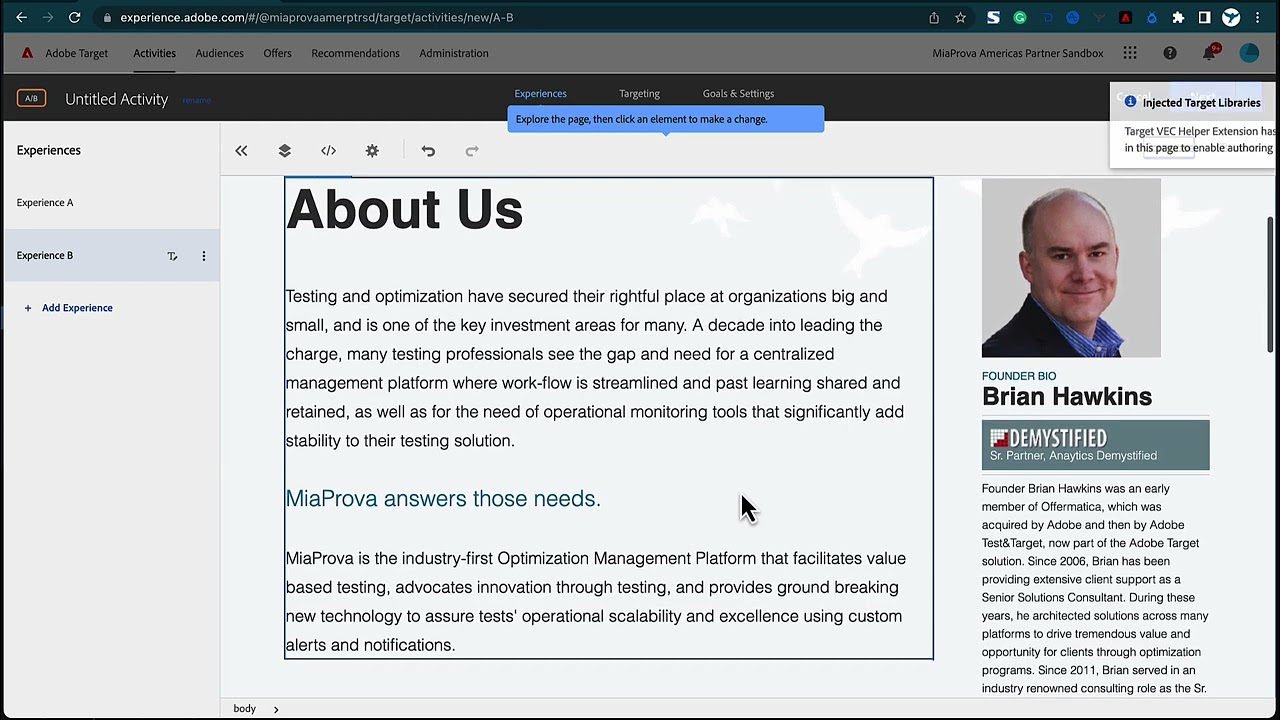
The video is about link tracking in Adobe Target and how to track links not just on one page but down a funnel. The approach works for XT, AB, and any type of activity type within Adobe Target. The speaker suggests updating the URL with a unique identifier, like s equals one, on each page and then tracking links on those pages by modifying the URL with s equals two, s equals three, etc. The changes can be applied with a visual editor or form-based editor. The conversion can be configured to be viewed as a page and URL contains s equals one, s equals two, etc. The speaker recommends using Adobe Analytics to get better selective reporting and suggests using conversion as an Adobe Target-related metric. The tracking information will not be ported into Adobe Analytics automatically and needs to be manually chosen.
Transcript: (00:00) an interesting question came in on measure slack related to Adobe Target I thought it’d be quicker to do a video uh versus typing something out so the question relates to link tracking uh and to track links not just on one page but uh down a funnel um related to an XT activity so I’m an outline an approach that will work for XT a b and really any type of activity type within Adobe Target that’s really helpful it’s something that I use a lot a lot of my clients use it but it’s also something that automatically flows into (00:33) Adobe analytics which is good for those that use a for T and something really really helpful so it looks like someone just replied as I’m doing a video so I’ve got uh Adobe Target up here A B activity but again it doesn’t really matter if it’s XT or a B so let’s assume the home page of our blog is page one so what I like to do is since um I’m assuming we’re we’re changing the links or doing content on these different pages but whether we’re doing that or not what I like to do is (01:05) update the URL put something a little bit unique like s equals one um so that we know that okay on this particular page s equals one because people can get to this page outside the test just like I imagine they can get to your links outside of the test so then I’ll jump over to browse and then I’ll actually go to this page and this will be my page two um but then let’s say I want to track I’ll go back to compose I’m going to apply the modifications let’s say I want to track then the Clank the link on the (01:39) about so I’ll just come here and then I’ll do and S equals two um so I’ll save that then I’ll go back to browse I’ll go to the about page and assuming this is Page Three I’ll come here go back to compose apply the modifications and then I will let’s say track the link to the privacy and I’ll edit the link within here and I’ll just do and SQL s equals three so I know if people are getting to these Pages outside because there’s they’re not having the S equals three so you know (02:14) you’re a member of that particular activity the fact that you’re getting that content um so applied those changes with visual editor or if it’s doing form based but then here in Adobe Target you can you can leave it Adobe Target reporting and then just configure the conversion to be viewed a page and then do you could do URL contains uh SE oops I can’t type S equals one you can add a new another URL to be S equals two uh but what I like to do uh I I try to run everything through a for T because (02:51) it’s so much better um selective particular report so we get that configured um but then down here I don’t use an analytics metric to be kind of a waste because you’re telling the reporting to be uh Adobe analytics here so in analytics workspace you have all of the uh analytics metrics within there um so I just like to do conversion which is an adobe Target related metric allows me to use Target profiles uh any metrics within Target um also by choosing or by letting it go into Adobe a4t the URL parameter (03:29) tracking is is within there as well so you can build a segment uh for that so I’m just going to do view to page URL is or I can do contains and I can do s equals one uh add another URL or s equals two add another URL s equals three so this this will get aggregated within um as visitors go throughout here then that goes into Adobe analytics and under Adobe analytics that’ll be activity conversions and then you can kind of break it down by Page to give you that funnel view um but if you’re not using a through T (04:07) if you wanted to use Adobe Target you could build a funnel out like this so you could do a conversion view to page URL contains and you can do s equals one then come down here add a new metric and then this will be conversion view the page URL contains s equals two and so you can build you could have as many of these Adobe Target related metrics uh within and that’ll give you a funnel view it won’t port this information into Adobe analytics you have to choose Adobe analytics here and then at that point (04:45) you get one single metric from Adobe Target to go into analytics as activity conversion so hopefully that was helpful
Adobe I/O is Adobe’s developer ecosystem where Adobe makes available its APIs for all of its many products. MiaProva makes very strategic use of the APIs for both Adobe Target as well as Adobe Analytics within Adobe I/O. Adobe I/O allows MiaProva to manage any and all Activities and Activity Types as well as Recommendations….
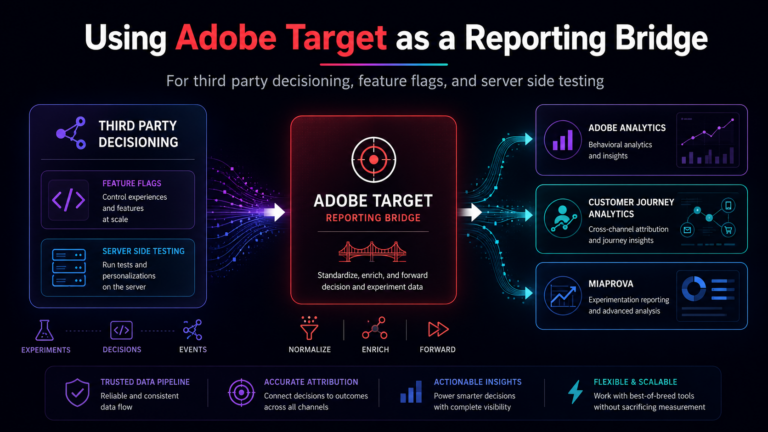
One of the harder parts of experimentation reporting is not the decisioning itself. It is getting the decisioning data into the reporting layer in a way that survives real world complexity. A MiaProva customer recently ran into this exact issue. They had recently added a third-party content decisioning and feature flagging platform to their stack….
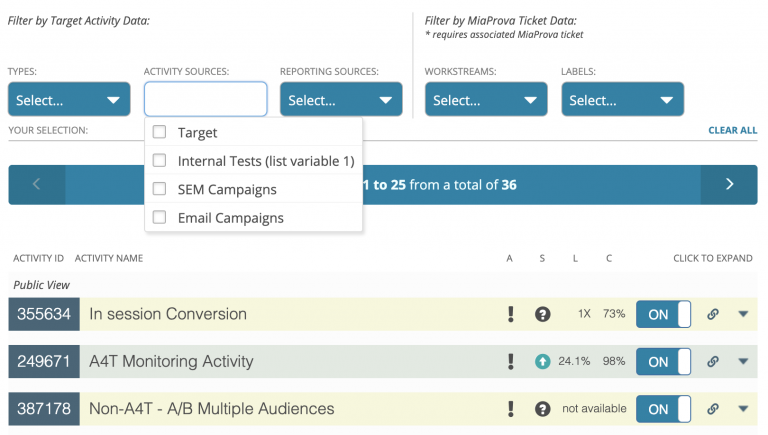
We added something pretty significant to MiaProva this week. Activity Sources. As you may know, MiaProva is the only Optimization Management Solution to integrate with Adobe Target and Adobe Analytics fully. Any Activity type or optimization effort in Adobe Target is fully available for management within MiaProva. Any of your Adobe Analytics Segments, Metrics, Calculated…
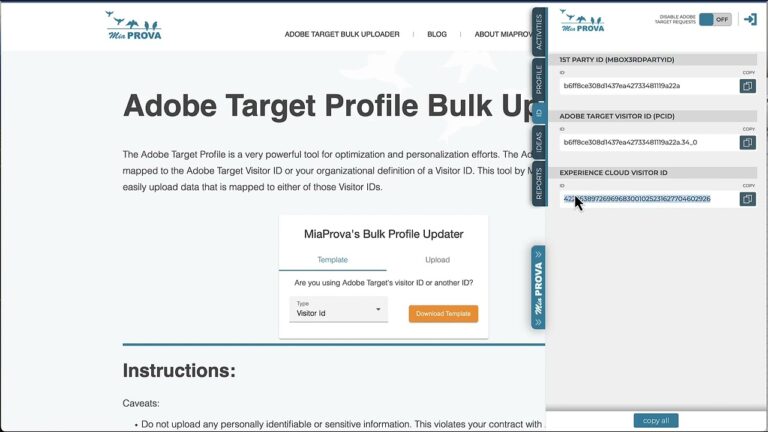
I have question around the bulk upload and if we can use the experience cloud visitor Id instead of the target visitor Id or first party id(another Id)?
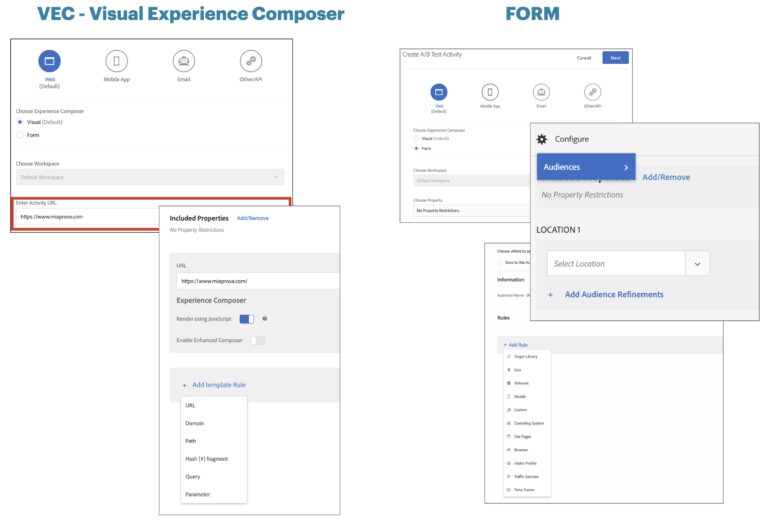
Over the years, we have gotten many requests from customers asking for clarity around how best to use Adobe Target Audiences and Locations when setting up Activities via the Visual Experience Composer (VEC) or Form-based creation. This video will share best practices and explain how best to leverage the functionality.
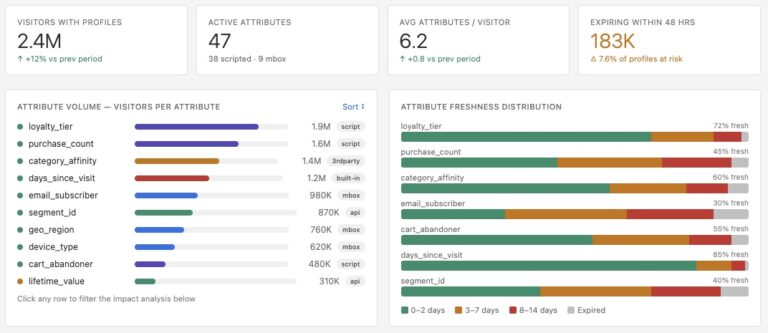
Why Adobe should build a Profile Intelligence dashboard directly into Target, and why doing so will change how the entire industry thinks about personalization data. There is a quietly remarkable capability living inside Adobe Target that most of its users have never fully explored: the visitor profile. It persists across sessions and devices. It runs…