
Adobe Target × Amplitude: The Visitor-Level Pairing That Turns Insight Into Action
The backstory
A few months ago a large financial institution asked Adobe about an enterprise-grade optimization and personalization platform. They were evaluating several options and had one non-negotiable requirement: the platform must integrate with their analytics solution, Amplitude, which they use across many touchpoints on both client and server, including events that occur outside page load.
Adobe brought in Adswerve to help. The MiaProva team has integrated Amplitude with Adobe Target for many organizations, and we partner closely with Adobe as a Gold Partner and back-to-back Emerging Partner of the Year.
After a rigorous evaluation with deep technical dives and custom use cases, the client selected Adobe Target. A key reason was how well Adobe Target and Amplitude work together and the integration patterns the MiaProva team provided.
I rarely pick favorites, but I will here. Among non-Adobe analytics platforms, nothing integrates with Adobe Target and amplifies value like Amplitude.
This post explains why the pairing works so well, how to implement it, and how MiaProva made it practical. We even include the code to automate the connection, including a one-line JavaScript addition for Amplitude.
The core idea: align on the visitor
Both Adobe Target and Amplitude reason at the person level. Target persists identity with Experience Cloud ID or a first-party ID. Amplitude unifies behavior with a User ID and Device ID.
MiaProva makes this alignment explicit. We standardize identity mapping and ensure that the events you care about carry Target activity and experience identifiers into Amplitude. This removes drift introduced by session or impression based tooling and keeps analysis consistent across days and devices.
What we pass to Amplitude
- Target activity name or ID
- Target experience or variant ID
- Optional treatment metadata such as offer code, audience name, decision rule
- First-party user and device identifiers for long-term stitching
With these fields in place, every chart, funnel, and journey in Amplitude can be cut by the exact Target experience each visitor saw.
Amplitude cohorts inside Adobe Target
One of the biggest wins is taking behavioral groups from Amplitude and using them as addressable audiences in Target by way of the Adobe Target Profile. Define cohorts in Amplitude based on real behaviors and outcomes, then publish and export them for targeting and personalization.
Amplitude cohorts turn raw behavior into precise, living audiences. You can define membership using real actions and outcomes across events, properties, and sequences, then have those cohorts update continuously as users qualify or fall out. This supports practical patterns like “viewed three or more PDPs and used filters,” “returned after thirty days of inactivity and completed search,” or “watched a video to 75 percent and started checkout.” Cohorts are retroactive, so you can test a definition against historical data, estimate impact before activation, and refine criteria without re-instrumenting. They also travel well. You can publish them to downstream tools, use them to segment funnels and journeys, power real-time dashboards, and pair them with Session Replay to see exactly how a defined group behaves.
The bridge to Adobe Target is the identity model. Each Amplitude cohort carries the identifiers you already use in product analytics, notably User ID for known users and Device ID for anonymous sessions. MiaProva’s Bulk Uploader or your CDP maps those identifiers to the same visitor IDs recognized by Adobe Target, such as Experience Cloud ID or your first party ID, so the people inside the Amplitude cohort are the very same people you can address in Target. That mapping allows you to sync cohorts as Target audiences or profile attributes, keep them fresh on a schedule, and activate offers, layouts, and messages with confidence that the targeting and the measurement both point at the same visitors. The result is a tight loop where you discover a pattern in Amplitude, form a cohort around it, and immediately act on it in Target while preserving a single view of the person.
Real-time reads in Amplitude for live experiments
When you launch a Target activity, you should not wait for a weekly report. Amplitude’s real-time ingestion means Target experience properties appear quickly on the charts you already use. MiaProva templates the analysis so experiment owners can:
- Watch guardrails such as error rates, latency, or add-to-cart drop-offs
- Track leading indicators like first session activation, search usage, and micro-engagement
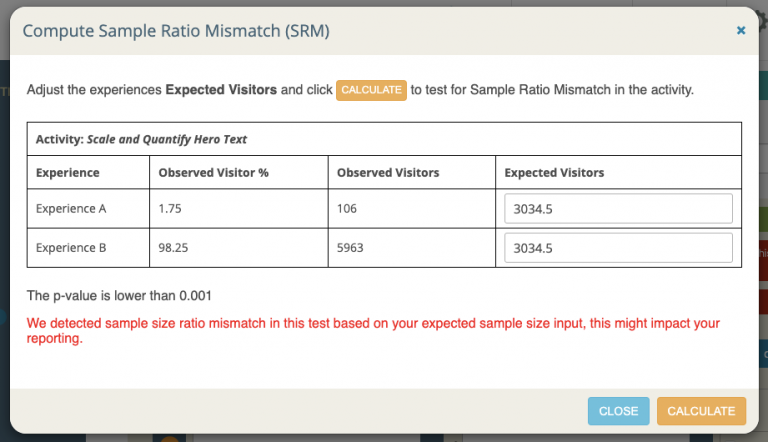
- Validate audience reach and mix to catch sample ratio mismatch early
- Compare variants across funnels and journeys without exporting data
These reads complement statistical analysis in MiaProva and Target. You get immediate directional insight and still rely on sound statistics to decide whether to ship or continue. The MiaProva team even put together this impressive example that demonstrates a Visitor getting into an Adobe Target Activity on page load and post page render with the click of a button.
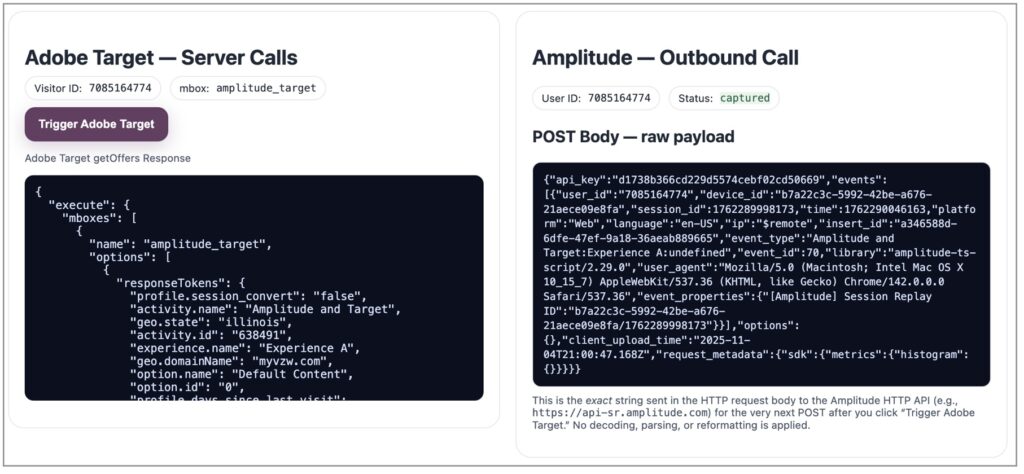
In the image above, we demonstrate Adobe Target and Amplitude aligning on the same visitor ID and an automated communication to Amplitude with key data about the Activity running. You can play with this yourself and on the bottom of this page, you can use the code that the MiaProva team created to automate this for Amplitude.
Session Replay that knows the experience
Amplitude Session Replay becomes more valuable when every replay knows which Target experience was served. Because MiaProva carriSession Replay becomes a force multiplier when you are running experiments in Adobe Target. Because the MiaProva integration automatically attaches Target activity and experience identifiers to the Amplitude event stream, every replay knows exactly which variant a visitor saw. That context lets product, design, and engineering teams watch the real treatment in the real journey and move from “we think” to “we saw.” You can spot flicker or rendering issues tied to a specific experience, confirm that targeting rules delivered the intended creative, and observe how behavior diverges between winning and losing variants in moments that matter such as search use, form interaction, or checkout friction.
This tight loop speeds both debugging and learning. Experiment owners can jump from a KPI dip to the precise replays behind it, validate whether the issue is UX or performance related, and decide whether to pause, fix, or proceed. Analysts can segment funnels and journeys by Target experience and then open replays for the exact slice that under-performs. The result is faster root-cause analysis, cleaner launches, and clearer evidence when you communicate decisions with stakeholders. As a bonus, Amplitude’s free tier currently includes 1,000 session replays per month, which is enough to make session-level validation part of every Target test without new tooling or budget approvals.
The integrated workflow
Plan in MiaProva
Define the hypothesis, KPIs, audiences, and guardrails. Link to the Target activity you will create or generate it through MiaProva.
Launch in Adobe Target
Publish the Activity. MiaProva ensures activity and experiences are tracked and monitored and the integration provides identifiers are captured and appended to the Amplitude event schema.
Measure in Amplitude
Use MiaProva’s ready-made charts for Adobe Target data or your saved Amplitude dashboards to monitor real-time progress and guardrails. Cut funnels and journeys by variant with a click.
Explore cohorts
Build cohorts based on behaviors and outcomes. Publish those cohorts back to Target as audiences for the next round of personalization.
Watch replays
Investigate sessions for any variant with full context on which experience was served. Validate UX hypotheses and uncover friction.
Decide and scale
Use MiaProva’s experiment analysis for statistically sound decisions, while Amplitude reveals where and why lift appears. Roll winning ideas into always-on Target activities and repeat.
Implementation checklist
- Identity strategy: confirm ECID and first-party IDs map cleanly to Amplitude User ID and Device ID
- Event design: add Target activity and experience identifiers as required properties; include offer code when helpful. Here is the implementation code for you and you only have to do this once: https://adswerve.tech/amplitude/
- Naming standards: keep activity and experience names human-readable for clean charts
- Cohort sync: publish Amplitude cohorts to Target as customer attributes or mapped audiences
- Quality gates: monitor sample ratio, event volume by variant, and guardrails in real time (MiaProva automates this for organizations)
- Privacy and governance: respect consent and retention policies; exclude personally identifiable fields from payloads
Why this pairing outperforms session or impression stacks
Visitor-level systems maintain a continuous model of the customer. You do not lose context at session boundaries, and you do not dilute outcomes across impression counters. Experiments follow a person across devices and over time. Cohorts are richer, replays are truthful, and measurement reflects how customers actually behave.
The bottom line
The integration the MiaProva team put together turns Adobe Target into a more curious and responsive personalization engine by wiring it to Amplitude’s real-time behavior analytics and cohorts. You move faster from pattern to experience and you can see, with clarity, how and why it worked. It feels like one system because it acts like one team.
If you want help mapping identity, event payloads, and cohort publishing, or want to learn about MiaProva, please reach out!