
Adobe Target Click Tracking Activity Conversions
Video highlights how users can leverage Adobe Target to track clicks and have that data available in Adobe Analytics.
Video highlights how users can leverage Adobe Target to track clicks and have that data available in Adobe Analytics.
MiaProva enables organizations to quickly and easily highlight the direct impact tests are making on organizational goals. Users of MiaProva can also make use of a wide array of strategic filters to make test review and communication seamless.
Can you quickly recall what tests were run 6 months ago on the homepage, and if the particular marketing promotion event during that week impacted the test readouts? How about knowing that 18 days ago, there happen to be an IT issue on the site that prevented some customers accessing the page that you’re testing, rendering the test ineffective?
MiaProva understands that calendar is a great way to maintain a collective memory for the Testing Program, as well as offering everyone a direct, visual view to see what’s going on.
Adobe Target allows you to target audiences that are not in other tests. But what happens if two activities are running at the exact location? What will Target do?
This video answers that and explains how you can manage things differently.
With MiaProva’s groundbreaking, patent pending automated monitoring service, you no longer need to worry about testing experiences breaking on the web site and impacting your customers!
Many times, business owners request a test to be run at a site location with low traffic, not realizing how crucial sufficient sample size is for effectively detecting the difference between test and control.
Also for many organizations that do not have very large volume of traffic, there often is the need to run multiple tests on the same page, making it crucial for everyone to understand how other tests might impact the one that you’re trying to run. In addition, as part of industry competitive research, many business users wants to know if their competitor sites are already testing certain features.
MiaProva offers a list of tools that easily help with your business users to research and plan for their test prior to them even coming to requesting it.
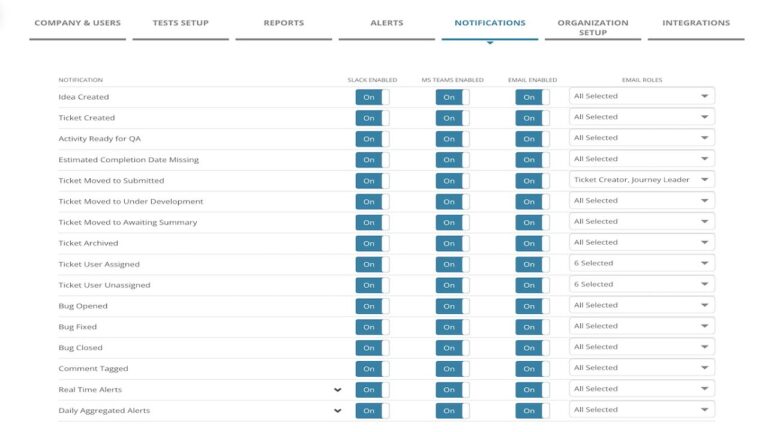
MiaProva has delivered considerable value for organizations through our notifications as events happen in MiaProva and when there are issues related to their Activities that are Live in Adobe Target.
We’ve now expanded on that ability to Microsoft Teams.